AxForge offering

Rent an RTX 5090, one card by the hour

Subject to confirmed capacity and terms: One NVIDIA RTX 5090 with 32 GB GDDR7 in a dedicated EU-hosted AxForge machine, with full SSH access. Pay per started hour and switch it on and off in the console, or book a week, month or year for a lower rate.

Check the console for current access, prices and availability.

One card · 32 GB GDDR7 €1.26 /hour on demand Dedicated · full SSH access rtx-5090.axforge.ai
Rent GPU €1.26 /hour on demand. A week, month or year earns a lower rate: from €0.90/hour by the year.
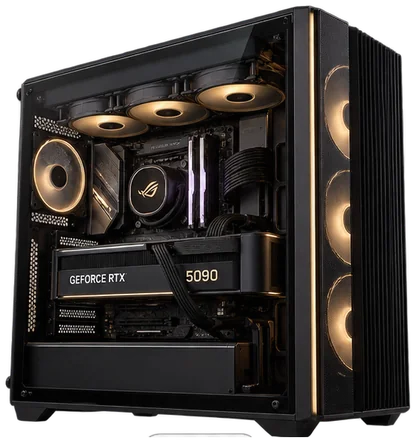
A machine with an NVIDIA RTX 5090

Why AxForge

Why RTX 5090 on AxForge

Fastest single-stream card on the boardOn the same-workload llama.cpp CUDA scoreboard the RTX 5090 decodes at 290.0 t/s with 14,073 t/s prompt processing, roughly 3.8× an RTX 3060. Community measurements, not ours.
Modern models at 4k contextHardware Corner's llama.cpp runs on one RTX 5090: Qwen3 30B-A3B MoE at 226.1 t/s, Qwen3 8B at 200.4 t/s, Qwen3 32B dense at 61.4 t/s. Active parameters and memory traffic beat headline parameter count.
One card, by the hourPay per started hour and switch the machine on and off in the console, or book a week, month or year for a lower rate.

Specifications

What is offered

CardOne NVIDIA RTX 5090 in a dedicated machine
Memory32 GB GDDR7
AvailabilityBookable in the console: take the next free slot or reserve a start time
TenancyDedicated machine, your traffic only, full SSH access
Price€1.26 /hour on demand
Longer bookingsfrom €0.90/hour by the year
RegionGPU rentals and bare metal run on our machines in Stockholm (eu-se-1) or Málaga (eu-es-1); the console shows each machine's city. AxForge serverless inference runs in Stockholm.
Community decode290.0 t/s single-card (llama.cpp CUDA scoreboard, Llama 2 7B Q4_0). Labelled, not ours

RTX 5090 catalogue reference: specifications and requirements. List prices in EUR.

How it works

Using this offering

1Confirm capacity and terms in the console before the rental steps below. A public request records demand; it does not reserve or provision a machine.
2Sign in to AxForge.
3Choose RTX 5090 and the term: on demand, week, month or year.
4Pay in the console; the machine is prepared for you.
5Add your SSH key and connect when the machine is yours.
6End the rental when your workload is complete.

Rent GPU or sign in to start.

FAQ

RTX 5090: common questions

Can I rent an RTX 5090 from AxForge?

Capacity and terms must be confirmed before a booking. Check availability in the console and take the next free slot, or reserve a start time.

What do I get?

One NVIDIA RTX 5090 with 32 GB GDDR7 in a dedicated machine serving only your traffic, with full SSH access.

What does RTX 5090 rental cost?

Capacity and terms must be confirmed before a booking. Listed per hour on demand; a week, month or year earns a lower rate. The prices are on this page and in the console.

Which models fit?

Models and MoEs that fit in 32 GB. It is the fastest-per-euro choice for them. When a model no longer fits in VRAM and starts spilling, decode collapses; for larger single-GPU models look at the 96 GB RTX 6000 Pro or the 128 GB DGX Spark.

Where is the machine?

GPU rentals and bare metal run on our machines in Stockholm (eu-se-1) or Málaga (eu-es-1); the console shows each machine's city. AxForge serverless inference runs in Stockholm.

Do you keep prompts on a rented RTX 5090?

No. Your model, your traffic, our hardware. Prompts are never persisted. Only operational metadata is kept for billing and operations.

Ready to use RTX 5090?

Rent GPU Sign in Talk to an engineer

Explore

More from AxForge

© 2026 AxForge · EU-hosted AI infrastructure Pricing Docs Trust Privacy Terms